Finding minutiae in microscopia
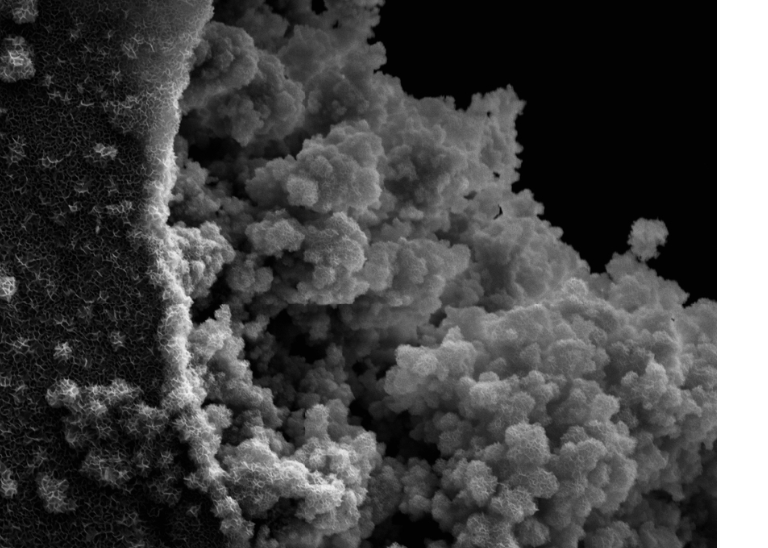
It’s never my intention to rush to beat a deadline, but that’s how this project worked out. First, I tried using the exhibit.so page I created during class last week. When a refresh of the page failed to produce the added images, I tried making a new exhibit of the same name with the same items. Exhibit.so was not cooperating.
Using the directions provided in class to create IIIF manifests for the Omeka S items, I succeeded in creating said IIIF manifests for the images of five coffee mugs in my collection set. Unfortunately, Exhibit.so was too busy or for whatever reason would not load the page with the images. Not until I read Linnea’s post indicating that she had the same problem, did I realize it was not exhibit.so but some fault with the manifest we generated for the Omeka S items. A quick search for an image with an IIIF manifest from a github page verified that other IIIF manifests would in fact successfully populate an exhibit.so page.
Exhibit.so allows the user to create a free or password protected account, add items using the IIIF manifest, and annotate the items. I created comments for one of the mugs, “Here’s Looking at 60” and assume that these would be the annotations. For the microscopic exhibit, I copied the descriptions from the original site as the annotations for each of the three images in the exhibit.
Two options are offered when selecting to share the exhibit. One option provides the URL; the other option allows you to embed the exhibit at 640×480 or two other higher resolutions. I learned to share the preview of the exhibit. Otherwise, the URL allows the visitor to edit the page.
Link to the working exhibit (left) versus the preview page (right) above.
I would not say I have a working understanding of IIIF manifests or API. To better understand the purpose of IIIF, I searched for “IIIF manifest” on YouTube. “IIIF” is a channel offering videos from up to 8 years ago, but the majority relate to their annual meeting/conferences since 2020. Different individuals host demos of IIIF on this channel. At least two of the presenters, Glen Robson (Feb. 8, 2023 https://www.youtube.com/watch?v=y0I5_BW1OLQ) and Tristan Roddis (June 22, 2017 https://www.youtube.com/watch?v=7nWGCGNPl6I) discuss IIIF and Annotations and IIIF for Storytelling, respectively. These examples use an open source site called Mirador to create digital cultural exhibits, but my investigation into creating an exhibit using Mirador proved futile. https://projectmirador.org/ This site indicates that you can create annotations of images using the comment tool, but the annotations would only be accessible from the creator’s desktop.
Robson’s presentation offered several examples of using annotations for a cultural heritage digital exhibit. These include transcribing documents, commenting or analyzing content, highlighting areas of the item like handwritten annotations in a printed book, and teaching or explaining content. He also noted that annotations in IIIF follow the W3C annotation model (annotation, body, target).
I can certainly imagine using annotations with images of original historic content. Handwriting is often hard to read, and transcriptions of handwritten documents could be crowd sourced. Ancestry.com offers transcriptions of handwriting on census documents as users hover over the handwriting on the document. I would be interested in learning how they facilitate this since learning about the IIIF annotations.
Offering annotations for exhibitions of historic and cultural materials could allow archive and museum collections to be more accessible to broader audiences. For example, the annotations could paraphrase text that is antiquated, thereby making it more accessible to younger audiences. Or, text could be offered in different languages or various fonts for the visually impaired. Perhaps the annotation could be an audio file to provide accessibility for hearing disabled patrons. For user centric designs, the site or application could offer opportunities for visitors to create their own annotations, or interpretations, of the cultural items on exhibit.
Beyond any technical challenges, I would argue that the time involved in creating these kinds of exhibits is the primary obstacle. By extension, the cost of creating the exhibits and the costs associated with maintaining them may be additional concerns. In my experience at a small museum, volunteers have been retired persons lacking the technical expertise to implement this kind of data. That’s not to say that all volunteers would be incapable, but many of the retired generation as well as undergraduate interns might require more oversight to accomplish this kind of exhibit. I could imagine using the technology to showcase details in historic photographs that illustrate or verify information I share online.

Leave a Reply
You must be logged in to post a comment.